Amateur Photographer verdict
Excire Foto 2027 is a powerful and very capable image management software and it’s easy to use too. It’s not cheap but it’s a sound investment and highly recommended if you shoot a lot of pictures.- Skimming through and rating images is fast
- New features such as Map view and Survey view work well
- Impressive search skills
- The price might deter some
- You still need access to a photo-editing app
It takes discipline to catalogue, keyword and rate images after a shoot. Will Cheung checks out Excire Foto 2027, a program that potentially could save you time and make your workflow much more efficient.
Enthusiast photographers shoot lots of pictures because it’s their passion; professionals do it because they are paid. Either way, at the end of the day the results need to be looked at, sorted and rated while the also-rans, duff shots and duplicates have to be identified and discarded.
It all takes time and one thing is for certain: sitting in front of a computer dealing with the aftermath of a photo shoot is not as much fun as being behind the camera.
Therefore, anything that can lessen the tedium of organising and sorting thousands of images is very welcome and Excire Foto 2027 is a software solution with the potential to do exactly that. It has no image editing skills, but it does have powerful and versatile AI-powered technology to manage the biggest photo and video collections, and it works locally so there’s no privacy risk.
Excire specialises in AI-driven image management apps, and has just launched Excire Foto 2027. It uses the same technology as the award-winning Excire Foto 2025 but has gained extra features and gives a better user experience.
Both are standalone image management apps while if you’re an Adobe Lightroom Classic user your preference might be for Excire Search 2026 which works as a Lightroom plug-in and has broadly the same features as its brothers.
Here, our focus is on the Excire Foto 2027 which is available for Mac and Windows at the discounted launch price of £199 / $219 for an outright purchase; there’s no subscription option.
Excire Foto 2027 at a glance
- Launch price £199 / $219 outright purchase (buy here to get a 15% discount of a lifetime license by using the code AMATEURPHOTO)
- Standard price £229 / $249
- Mac and Windows compatible
- AI-assisted culling
- Powerful Find tools – Text prompt, Text recognition, People, Face, Keyword, GPS
- Map view
- Automatic AI keywording
- AI-powered Aesthetic rating
- Focus peaking mode
- Survey view mode
- Timeline view
- Fast image display
- Integral video player
- Runs locally
Excire Foto 2027 – getting started
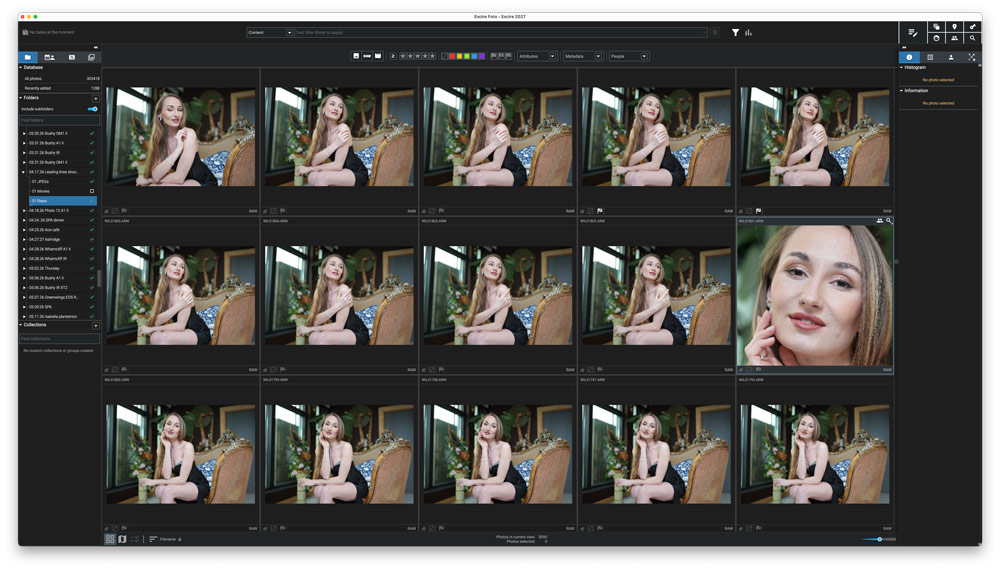
Open Foto 2027 and you’re presented with an easy to navigate interface dominated by a large central area where images can be viewed in a gallery which can be zoomed in for bigger thumbnails or shown singly.
One big handling benefit of Foto 2027 (and Foto 2025) is its speed, you can view and rate large images very quickly. There’s no lag waiting for an image to refresh before you can make an assessment.
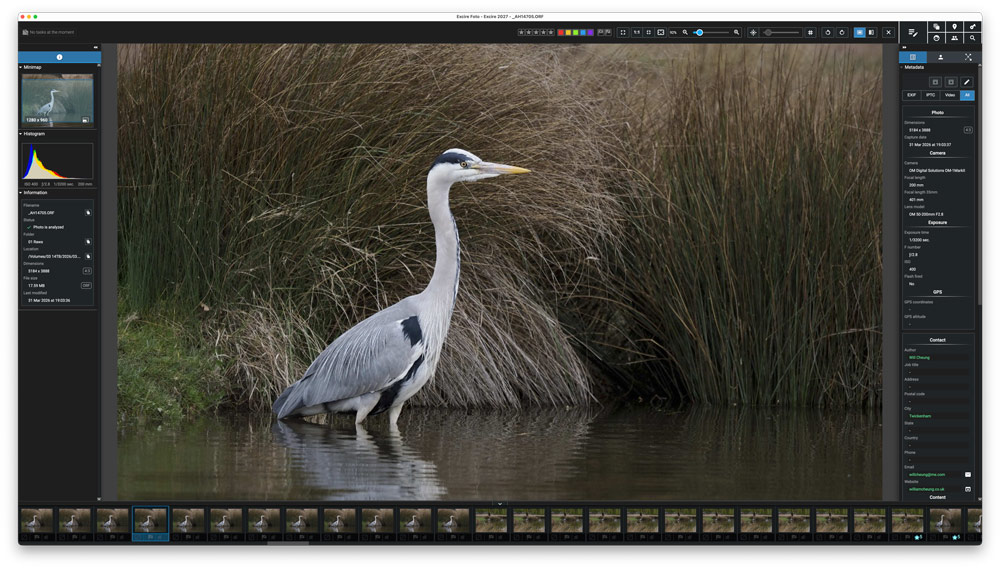
Every image must be initialised by Excire first and that creates a database, so you need a fast hard drive with plenty of extra capacity for future images. My 303,000 images created a 104GB database.
You kick off the process by going to File>Open database>Choose new folder for database. For my image catalogues I use a 4TB NVMe SSD in a 40Gbps enclosure, so I used that. This HD was connected with Thunderbolt 4 cable to a 32GB RAM Mac Studio with a M2 Max Chip running the latest Tahoe OS.
To add folders to Excire use the File drop-down menu or use the ‘+’ in the Folders palette. During import, the app creates previews, analyses images, adds keywords and aesthetically rates your images, and everything is done locally so no files or data is uploaded which means no privacy risk.
Given the processes that Excire runs, you won’t be surprised to hear that it takes time. Excire suggests importing big image collections overnight and that is good advice. I started with a year’s worth of work which was 183,520 image files, mostly high res Raws but also large DNGs (including some of around 500GB), TIFs and JPEGs.
This took 17 hours, 22 minutes and 35 seconds according to the Status Report, although to be fair, I was using the computer for other tasks for much of that time. The good news is that you only need initialise your work once and uploading fresh shoots is much quicker. For example, a day’s shoot of 8376 shots was processed in 20 minutes 33 seconds.
Excire Foto 2027 – key functions
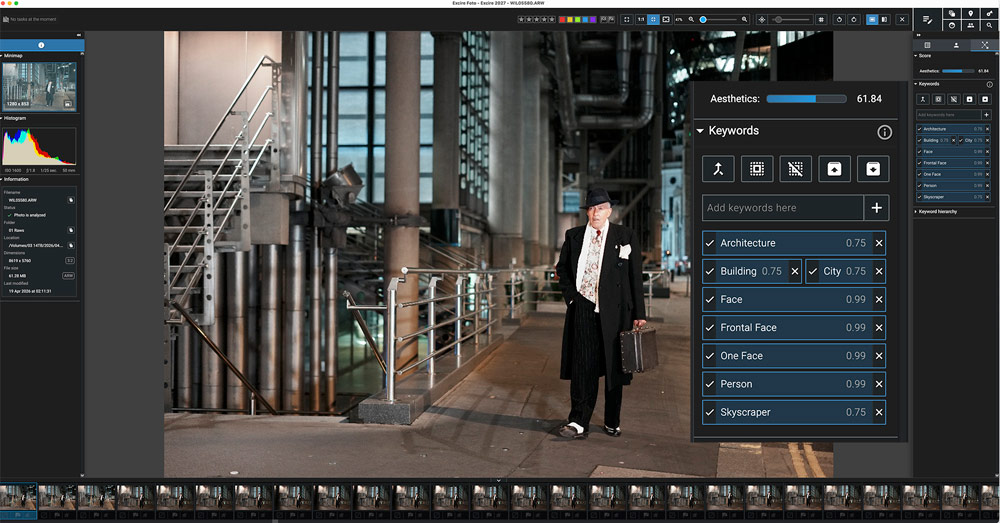
During initialisation, Excire automatically adds keywords and an Aesthetics rating out of 100 to your images and you can check these by clicking on the Excire logo on the right side of the interface.
How many keywords are added and in how much detail varies and depends on the image and of course you can add your own keywords. In the accompanying screenshot above featuring a man walking through the City of London at night we have a good range of keywords including City, Skyscraper and Frontal Face. For a picture of a heron standing in a lake the keywords were Animal and Bird while for a kestrel you also got Hawk and Predator.
Generally, the auto keywording is more effective with people pictures and while you get general keywords with nature you don’t get specific species or location details with landscapes. Famous spots, however, do seem to be recognised so a photo of Big Ben was correctly identified together with keywords Tower, Travel, Clock, City, Sight, Building and Architecture.
Excire’s AI driven keywording skills are worth having and they are useful, especially if, like me, you’re not a committed keyworder. Whether the app’s Aesthetics rating skills is useful is a matter of opinion. It’s useful if you need to quickly pick the best images – according to Excire’s judgement – from a shoot but if you took time to look at your photos critically, your opinion is likely to differ from Excire’s.
Of course, a photo’s aesthetics is a subjective matter, so it doesn’t mean Excire’s Aesthetics rating are not worth using.
Map view
Map view is a new function and to use this you need photos with GPS co-ordinates, whether you add them at the time of shooting or afterwards. For travel, press and landscape photographers this level of detail is important.
Apart from my phone photos, I didn’t have any Raws with GPS data so for this test I set up my Sony and the Sony Creator app on my phone to record GPS details and did a few photo shoots at local locations.
Map view works well and being able to click on each location and see the images shot at that spot is really cool. Obviously how accurate the feature is depends on the GPS information. On a shoot in London’s Bushy Park, the GPS was accurate enough for captioning purposes, but when I took a seriously deep dive into the map, I noticed I had taken some shots south of the river Thames which wasn’t the case.
This is not Excire’s issue as it just uses data from the file and to prove this, I imported the same images into Lightroom and checked its map function too, and the same errors occurred so this was an issue with the GPS data recorded. So the Map view feature is a neat arrival.
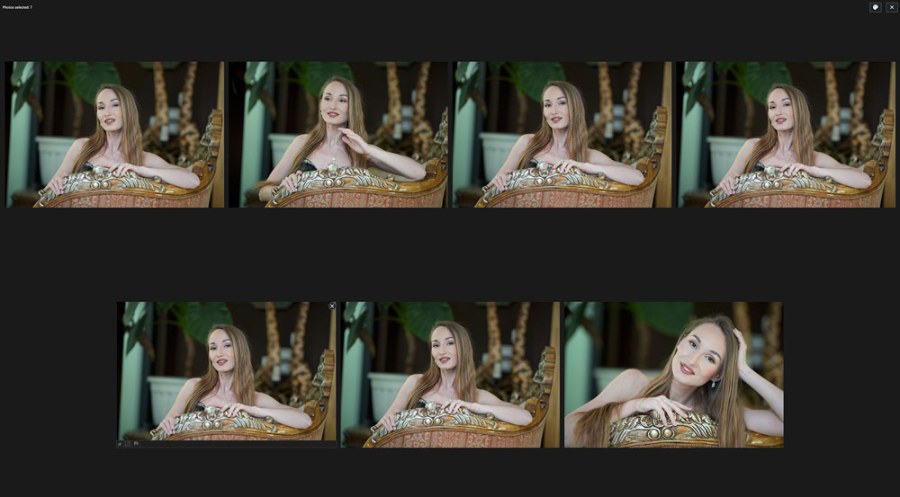
Equally cool is Survey view which shows just images against a black background. Being able to view from one to a lot of images in such an uncluttered environment is excellent. On my 32in screen, I selected 200 files and Survey view showed 103 individual images with the remainder off-screen waiting to make an appearance as those on show were deselected.
The only extra I would have liked is a way to rate images with a single key stroke. Hover in the top right corner and an ‘X’ appears so you can remove the image from Survey view with a single click but to star or colour rate you have to click on the bottom left corner, and a sub-menu appears where you do the rating.
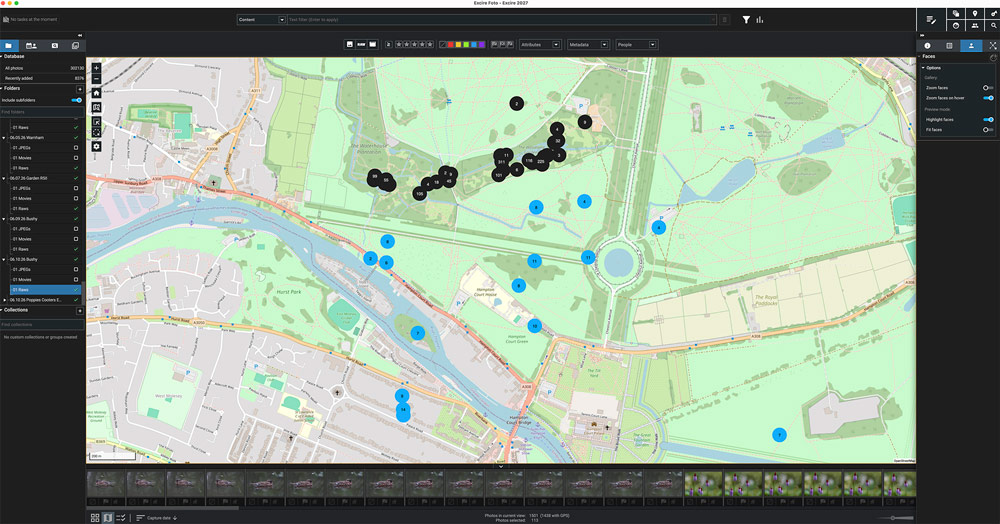
Image searching skills
The search tools in Excire Foto 2027 are very powerful. The ability to search by GPS, duplicates, similar images, keywords, faces, and people were present in Foto 2025, and they showed themselves to be very effective.
My favourite search tool was Find by text prompt. I loved being able to type in a description of what you’re looking for, and the software does a great job at finding it. Better still, if you’re looking for images to depict a mood, emotion or people performing a specific activity, Excire coped with that too.
Searches using the find tools can be refined.
You can put a limit on the number of images you want the software to find, or you can ask it to be Strict or Loose in its search, with a bias towards the former being recommended.
AI text recognition is the new talent in Excire Foto 2027, and it worked fine and it’s fast too. The option is available in the Find by text prompt or in the top context bar which has the options of searching for Content, Text in photos or Metadata.
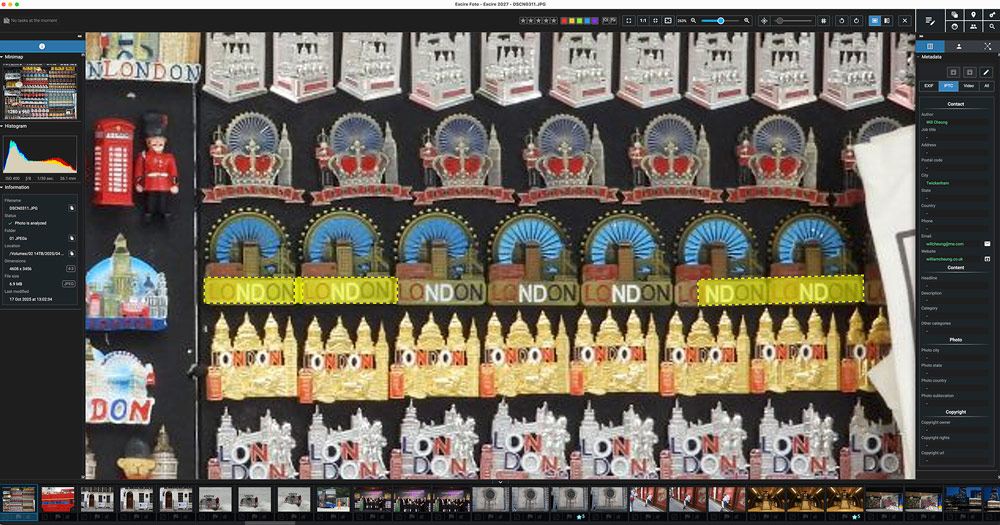
What impressed was that even when small words in the scene were found (although in the London example shown above not every ‘London’ in the scene was highlighted). In another image found in the same search I was impressed that Excire even found shots where the first ‘n’ in London was flipped in a retailer’s logo.
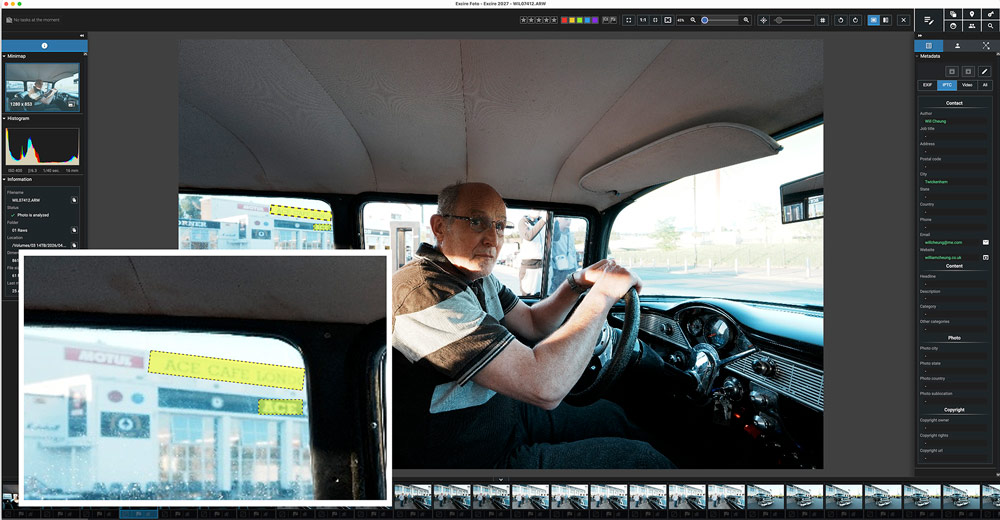
In the other example shown here was a shot of my friend Tony in his car outside the famous Ace Café. Excire still found the word ‘Ace’ even though in the original picture it was small and overexposed. If you have a need for this feature, I think you will be pleased with its effectiveness.
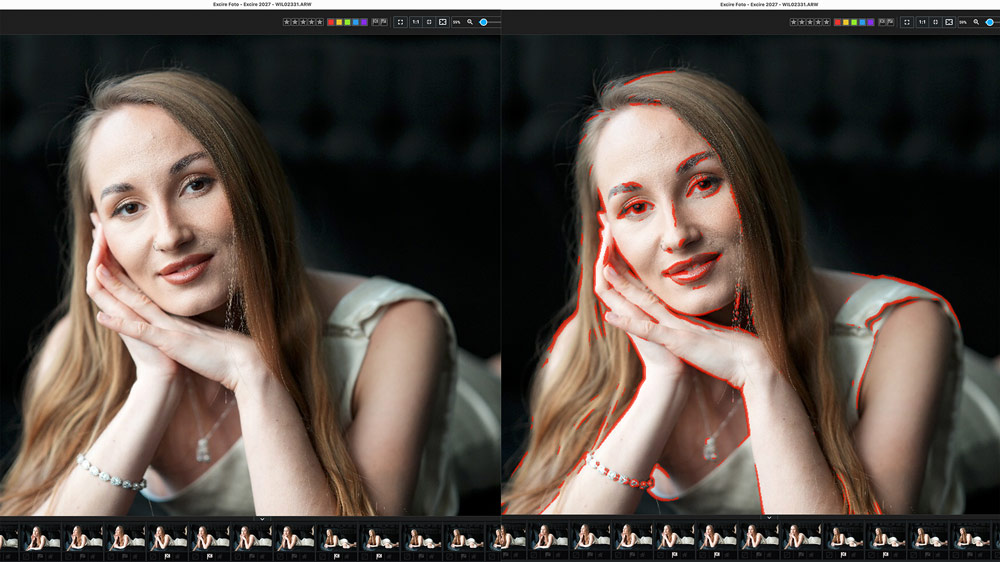
You can also check sharpness with the new focus peaking mask (the red lines on the right side of the below image) in Excire 2027 and it’s available in single image preview mode. The Peaking Mask threshold can be adjusted to suit your taste.
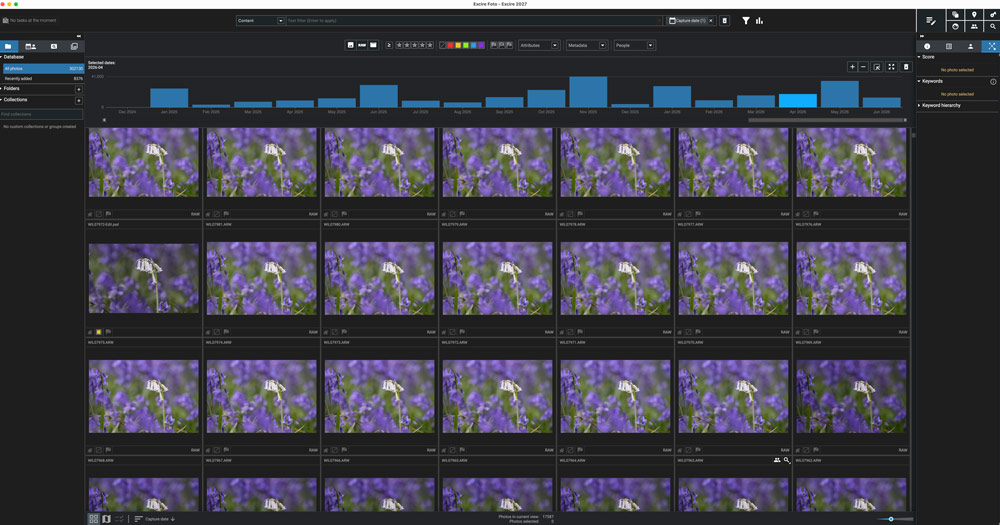
Also new in Excire Foto 2027 is the image timeline – the blue graph along the top of the interface in the image below – which you can zoom in and out of. Here you can view your images according to their capture date.
Excire Foto 2027: Verdict
I tested Excire Foto 2025 earlier in the year (click here for that review) I was impressed. Excire 2027 is a step on from its predecessor (which remains available at a lower price) with several worthwhile new features.
AI text recognition worked well and is a practical search parameter that photographers of many genres will find handy. If you are looking for a location, say a particular street, a brand or sponsor name, this tool could save you time.
I liked Map view too and while I am not going to revisit existing files to add GPS data, moving forward I will try on future trips to exploit this feature.
Survey view was also a hit with me and I liked being able to view a selection of images in a calm viewing environment that I could funnel down quickly. I also liked the timeline and being able to see shots in gallery view from a month and even single days.
Excire Foto 2027 is a significant investment, even at its launch price of £199 / $219. It won’t suit everyone but if you’re reasonably loose and free with your shutter finger and want to keep track of your photos and videos, this software will appeal.
For those who shoot a lot, whether for pleasure or professionally, Excire Foto 2027 has a lot going for it. At the very least, you should try the trial version to check out its potential before making a judgement.

Further reading