After a long photo shoot on a warm summer’s day, the last thing you need is a tortuous session in front of the monitor sifting through your output. Will Cheung shows how Excire Foto 2027 can be a real time saver, whatever camera you use.
I recently decided it would be fun to spend 24 hours with like-minded people photographing one of the world’s great cities, namely London.
So, I went to this year’s Photo 24 with my partner Annie without the stress of being the event organiser (I first got involved with Photo 24 over 10 years ago). This also meant I could stay as long as I wanted and enjoy some picture taking.
The event briefing took place at the Fujifilm House of Photography in Covent Garden, so it was the perfect central base to start from, and we got there in plenty of time for the noon launch, so it was a chance to catch up with old friends.
A presentation kicked off Photo 24 with a run-through of the walks and shoots, competitions and challenges and details of hospitality venues which were available as refuges for the whole 24 hours for free.
Having some downtime and the chance to recharge your batteries, both figuratively and literally, is important because being on your feet for the whole 24 hours is not feasible.
Many attendees go along with an idea of what to shoot and locations to visit. As this my first Photo 24 as a photographer, I didn’t have a plan at all but thought I would go with the flow.
The outfit I took along reflected that lack of purpose although it was a decent kit. I knew I wasn’t shooting into the night so I didn’t bother with my Gitzo travel tripod, which also meant I wasn’t going to shoot long exposures so no need for my Kase filter set.
What I did take was my Sony Alpha A1 II together with two Tamron zooms, the 28-75mm f/2.8 and the 50-400mm f/4.5-6.3, and I threw in at the last minute my Sigma 35mm f/1.4 just in case I needed a fast aperture optic.
Basically, it was my usual urban kit and although I lacked ultra-wide coverage, I find myself nowadays ‘seeing’ more in telephoto using longer focal lengths to isolate details and compress perspective.
After the briefing, it was time to get shooting. There was an architecture walk around the West End led by Sarah Toon so we joined that. Remarkably, as a Londoner and a frequent visitor the walk took me to a couple of spots I have never ever been too, even though I have walked close by on many occasions.
I think that is one thing about these events: you ‘see’ and appreciate scenes from a photography standpoint that you usually take for granted, plus you get inspiration from those around you.
After the walk, it was time for a leisurely lunch, followed by shooting around Soho, Trafalgar Square, Charing Cross and up The Strand. Time flew and we were soon heading over Waterloo Bridge for the train station and home.
Sorting out the shots with Excire Foto 2027
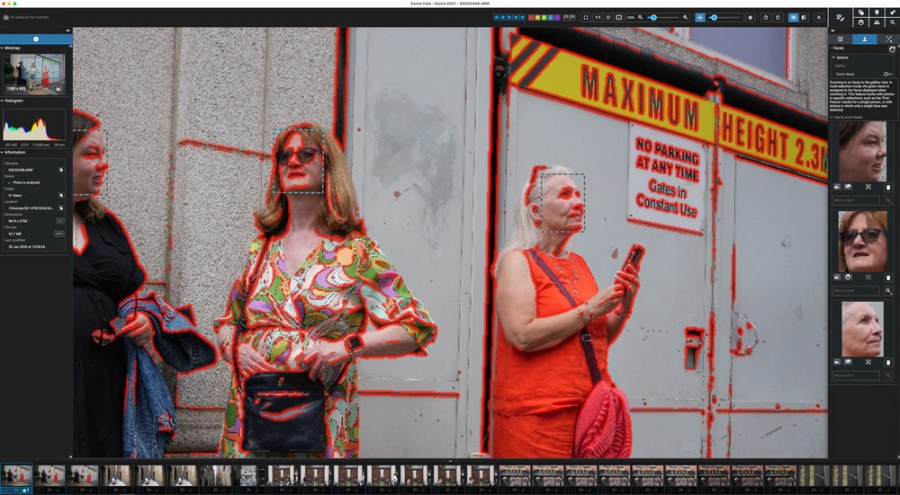
I took around 1600 shots which was modest for me but still a respectable number! My workflow started with downloading and initialising the images in Excire Foto 2027. The software then analyses the images with AI and adds keywords and an aesthetic rating to every image.
What I used to do was import photos straight into Adobe Lightroom Classic, but this app is so slow delivering large previews that is annoying and frustrating to use for sifting through large image collections.
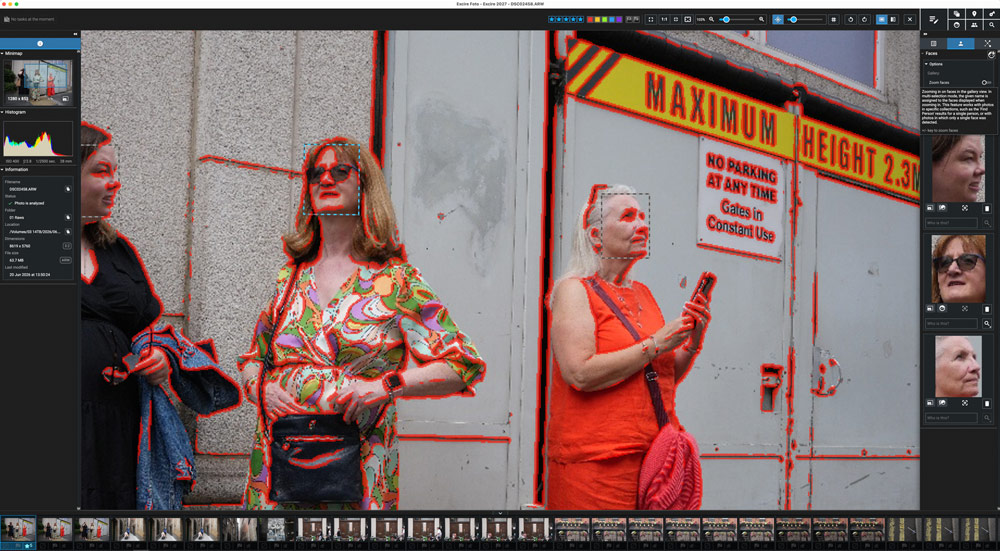
In Excire Foto 2027, I can flick from image to image in full-screen view using the arrow keys, rating and flagging them as I go. That’s what I did with my Photo 24 images. Excire Foto 2027 has AI culling skills but for this shoot where I didn’t have long sequences or loads of similar images to work through, I could do it manually.
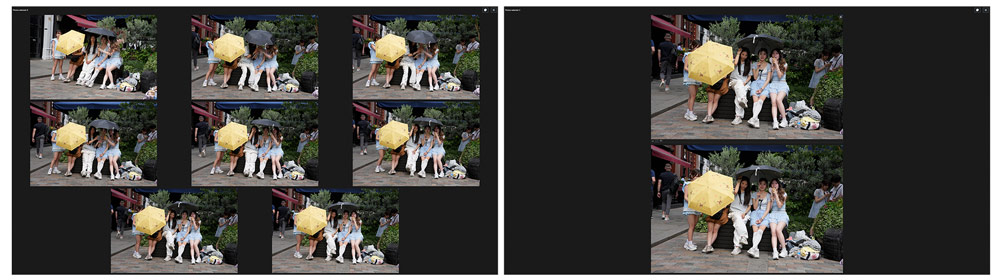
Using single image view I could check focus with the focus-peaking tool so no need to zoom into the preview, and I also used Survey view, another new feature in Excire Foto 2027.
Where I had several similar shots, I could select them and take them into Survey view which places the images on a plain black background. Here, I can star or colour rate them and as images are rejected the remainder get larger on screen. It’s a cool feature.
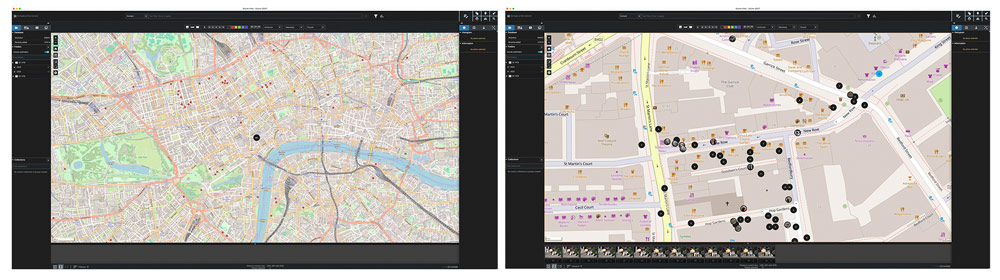
Another new Excire Foto 2027 feature is Map view where the software reads the GPS co-ordinates off photos and uses that data to place where you shot those images on an interactive map.
Benefits of Map view
To be honest, until now I have not bothered with GPS on my camera photos, but I am going to start to make the most of Map view. I’ve downloaded the Sony Creator app, paired it with my camera and started recording GPS data.
For this London shoot, Map view showed I had taken 490 images because I shot many more in the West End. That was obviously wrong so somehow I had managed to turn off the GPS facility halfway through the day.
Lesson one: I need to get the GPS technology working reliably. Lesson two: GPS co-ordinates are not always accurate, although good enough for most purposes, but that isn’t Excire’s issue.
Zooming into Map view the single black dot became many more dots with numbers showing how many shots were taken at each location. Clicking on a black dot turns it blue and the images shot at that spot are displayed across the bottom and clicking on a thumbnail shows them large.
With Excire Foto 2027’s help I quickly deleted the obvious dross, had my five-star images and a selection of three-star photos, which are images I like, are back-ups to the five-star images or just record shots.
I am probably not ruthless enough in culling, but I still managed to significantly whittle down my original 1600 images. With these, I stored the metadata so ratings and keywords show after being imported in Lightroom, and I was ready to start editing but there’s no rush and I prefer to let the emotion of the shoot fade so I can look at shots more objectively.
So, that was another Photo 24 ticked off, and the photos safely rated and backed-up – now onto the next shoot!
More about Excire Foto 2027
The new Excire Foto 2027 app retains all the rating, culling and search skills of Foto 2025 plus it has gained several significant features.
- AI Text Recognition gives a new way of searching the image database and the software will automatically detect visible text in your images, and it does this quickly. It means if you’re looking for a place name, street, shop front or brand name, you can do it accurately and very quickly.
- Another major feature is Map View. Excire Foto 2027 automatically detects GPS data – whether embedded at the time or added post-shoot – in your images and videos and places where you shot the content on an interactive map.
- Click on an appropriate location and you immediately see all the images shot there. It’s a great tool for travel, street and landscape photographers.
- If you need to find images taken at a particular time frame, there’s a powerful timeline tool and it’s intuitive to use too. Just zoom into the timeline graph and the date you are looking for, and you see the images instantly and then you can rate, keyword and discard your work as normal.
Excire Foto 2027’s workflow is now even more efficient with, among other features, a redesigned search bar and Survey view, where you can assess images quickly in an uncluttered interface. Watch out for a full review soon.
Excire Foto 2027 is currently available for a limited-time launch discount. (Use code AMATEURPHOTO for an additional 15% off your lifetime license).
Related reading
Do you want to win some great prizes for your photography? Enter your photos in our International Amateur Photographer of the Year competition. Free entry for photographers aged 13-21.
Follow AP on Facebook, Instagram, YouTube, TikTok and Irys.