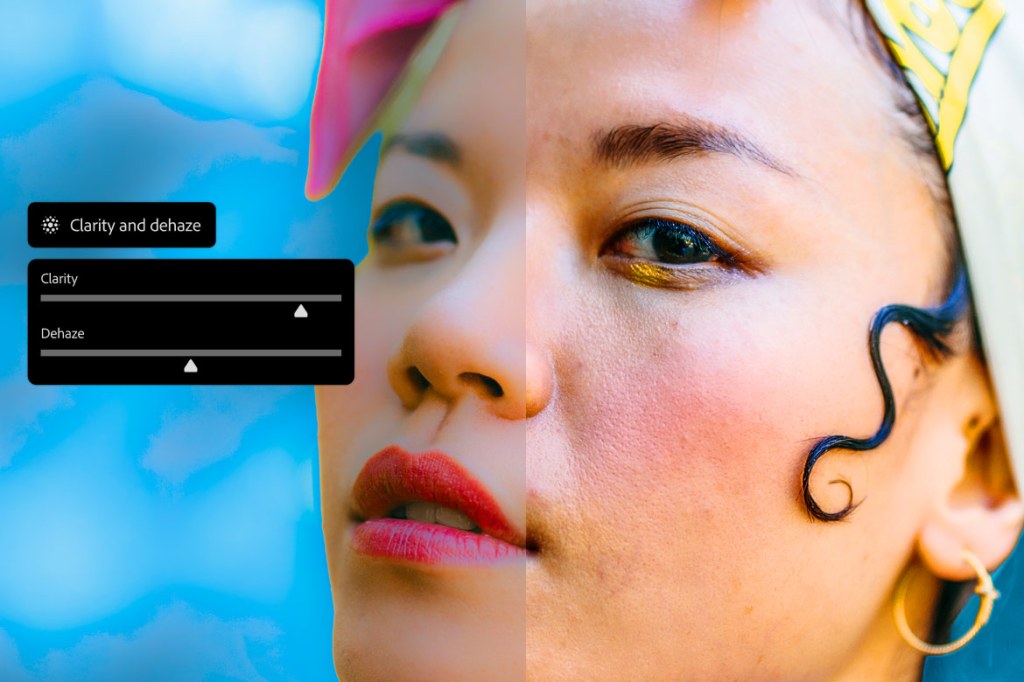
At the top of the list of innovations Adobe just announced for Photoshop, perhaps the most welcome for traditional photographers is the inclusion of Clarity, Dehaze and Grain adjustment layers. As one of the best editing software for photographers I always wondered why such a simple and widely used tool, such as Clarity was only available in the Camera Raw panel. Lo and behold, my wonderings were answered, and now they can be masked and edited non-destructively too.
If you mostly use Photoshop to remove artefacts from your images than you should definitely get this update. The Firefly powered AI Generative Fill, Generative Expand, and Generative Remove tools had a big revamp and now promise fewer artefacts, sharper detail and up to 2K resolution. It should also answer some pesky problems like visible seams and create more natural looking lighting and overall more polished results.
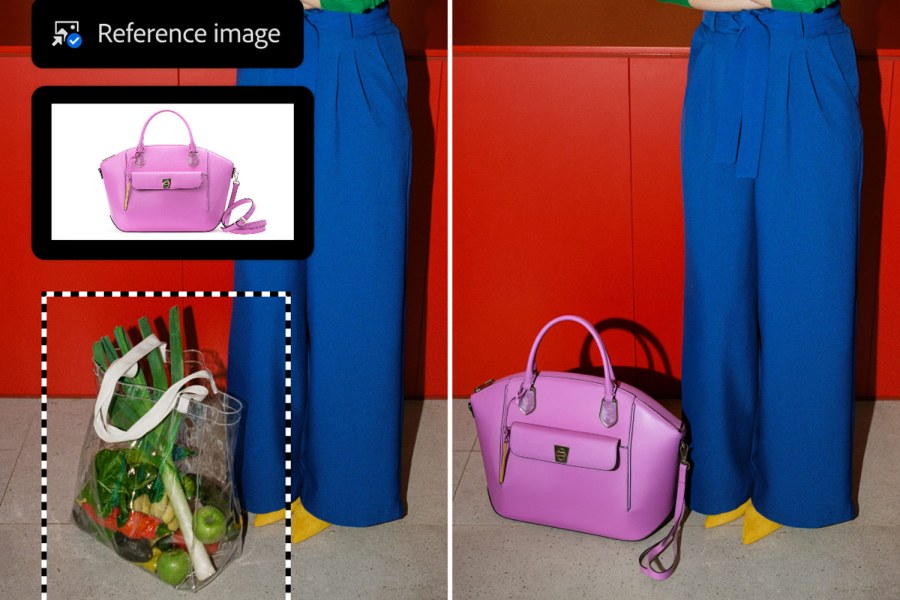
Using a reference object and generating a background around it got better too, and now preserves the original object, unlike before when it could expand and add weird outlines. A beta version of Dynamic Text will allow you to simply select a text layer and transform it to circular, arched or bowed shapes. Whether you’re a purist looking for better control or a digital artist leaning into the power of AI, this update finally addresses those long-awaited workflow issues.
From Adobe:
New innovations include
All-New Adjustment Layers for Non-Destructive Editing: Clarity and Dehaze, Grain
Now generally available, Clarity and Dehaze, and Grain bring powerful non-destructive, maskable, layer-based adjustments directly into Photoshop, making it easier to precisely refine texture, depth, and detail. Creatives now add dimension to images with Grain, cut through atmospheric haze and balance lighting with Dehaze, and enhance subject structure and crispness with Clarity, all while masking and blending each adjustment seamlessly for total creative control over your final output.
Upgrades Across Firefly-Powered Generative Fill, Generative Expand, and Remove Tool
Now generally available, Firefly-powered Generative Fill, Generative Expand, and the Remove tool deliver higher-quality results with 2K resolution output, sharper detail, and fewer artifacts. These upgrades improve prompt adherence, reduce seams, and create more natural lighting and depth for more realistic, polished edits.
More Creative Control in Reference Image with Objects for Generative Fill
Reference Image for Generative Fill gets a major upgrade, giving Creative Pros more control by preserving the identity of a reference object when generating and compositing. Reference Image with objects delivers geometry-aware results that better match the scene, reorienting to the correct scale, rotation, lighting, color, and perspective.
Dynamic Text (beta)
New in beta, Dynamic Text makes it easy to transform any text layer into circular, arched, or bowed shapes in just a click. Simply select Dynamic Text and choose a shape, and Photoshop will automatically fit and resize your text, so you can create, move, and refine text along paths quickly, without tedious workarounds.
Related reading:
- Best Photoshop alternatives – no-subscription photo editing software
- Lightroom vs Photoshop – which is best for photo editing?
Follow AP on Facebook, Instagram, YouTube and TikTok.